Friday, October 23, 2015

Did you know that SharePoint has a Work Management Service REST API?

Technorati Tags: ,,

There has been a lot written on SharePoint’s Work Management Service and yet it still has many misconceptions by developers about the capabilities of  the API. This powerful SharePoint feature aggregates, synchronizes, and updates tasks from across SharePoint, Exchange, and Project Server. Many developers may not have leveraged this feature since it cannot be called from a SharePoint Add-in. Developers have been left to use the ScriptEditor web part along with the JSOM API. In this post I will show you how you can enable the use of Work Management Service from a SharePoint Add-in on-prem, and how to use the existing REST API.

Enabling Add-in Support for the Work Management Service

In 2013 I created the SPRemoteAPIExplorer Visual Studio Extension (Easy Development with Remote API). This extension documents and makes the SharePoint on-prem remote API discoverable. This blog post explained how SharePoint uses xml files located in 15/config/clientcallable directory to build a cache of metadata of what is allowed in the SharePoint remote API. Each xml file contains the name of the assembly that contains the metadata along with the “SupportAppAuth” attribute which can be set to true or false. If this attribute is set to false then SharePoint will not allow the namespaces for that remote API to be called from an Add-in. In addition, if the namespace you are calling from an Add-in does not have one of these xml files, then you receive a “does not support app authentication” error. Below is the contents of the ProxyLibrary.stsom.xml file which points to the “server stub” assembly for most of the basic SharePoint remote API.


Microsoft.SharePoint.ServerStub, Version=15.0.0.0, Culture=neutral, PublicKeyToken=71e9bce111e9429c

When I was comparing SP2013 with SP2016 I noticed that the work management namespace has a “server stub” assembly but not an xml file in the 15/config/clientcallable directory. So I just created one just like the one in SP2016 called ProxyLibrary.Project.xml pointing to the Work Management server proxy. 

Microsoft.Office.Server.WorkManagement.ServerProxy


I then just did an IIS reset and lo an behold you can now call the Work Management API from a SharePoint Add-In.


So What’s Available in REST?


Once I had added this xml file it was able to be exposed in the SPRemoteAPIExplorer extension. The extension shows all the classes and methods and whether they are available for JSOM, .Net and REST. Now I could see just about everything is available to be called from REST except one important thing … reading tasks! The UserOrderedSession.ReadTasks method takes a TaskQuery argument which cannot be serialized via  JSON. It is very complex type. However, SharePoint does supports some very complex types via REST such as the SearchRequest type for REST searches. So what’s the deal?


The good news is that you can do just about everything else that the JSOM API supports. Below is an example of creating a task with REST.

function testWorkManagmentCreateTask() {
hostweburl = decodeURIComponent(getQueryStringParameter('SPHostUrl'));
appweburl = decodeURIComponent(getQueryStringParameter('SPAppWebUrl'));

var restSource = appweburl + "/_api/SP.WorkManagement.OM.UserOrderedSessionManager/CreateSession/createtask";
$.ajax(
{
'url': restSource,
'method': 'POST',
'data': JSON.stringify({
'taskName': 'test REST create task',
'description': 'cool stuff',
'localizedStartDate': '10/18/2015',
'localizedDueDate': '10/25/2015',
'completed': false,
'pinned': false,
'locationKey': 5,
'editUrl': ''
}),
'headers': {
'accept': 'application/json;odata=verbose',
'content-type': 'application/json;odata=verbose',
'X-RequestDigest': $('#__REQUESTDIGEST').val()
},
'success': function (data) {
var d = data;
},
'error': function (err) {
alert(JSON.stringify(err));
}
}
);

}
Another example here to get the current user's task settings:
function testWorkManagmentREST() {
hostweburl = decodeURIComponent(getQueryStringParameter('SPHostUrl'));
appweburl = decodeURIComponent(getQueryStringParameter('SPAppWebUrl'));
var restSource = appweburl + "/_api/SP.WorkManagement.OM.UserOrderedSessionManager/CreateSession/ReadAllNonTaskData/UserSettings";
$.ajax(
{
'url': restSource,
'method':'POST',
'headers': {
'accept': 'application/json;odata=verbose',
'content-type': 'application/json;odata=verbose',
'X-RequestDigest': $('#__REQUESTDIGEST').val()
},
'success': function (data) {
var d = data;
},
'error': function (err) {
alert(JSON.stringify(err));
}
}
);

}

What is the Future for Work Management REST in SP2016


SP2016 allows the Work Management API to be used from SharePoint Add-ins. Unfortunately, you still can’t read tasks from the REST API. Also, Office 365 still does not allow the API to be called from SharePoint Add-Ins. In the mean time it is good that you can still use the API from REST. If you need to learn more on how to call the Work Management REST API use the SPRemoteAPIExplorer extension. A very useful extension!

Monday, August 31, 2015

Using Search as a Rules Engine

Technorati Tags: ,,

I have recently been working on a project where we needed to evaluate the state of an object and depending on the state take certain actions. Seems like a simple coding task to get this done, unless the rules to evaluate state are completely dynamic. An application where rules need to be captured and easily changed typically calls for a rules engine. A rules engine separates business rules from the execution code. Most rules engines require the use of variables along with rules implemented in some framework code. This could be a scripting language or a full fledge programming language like C# or Java. If the rules change usually some code change must take place.

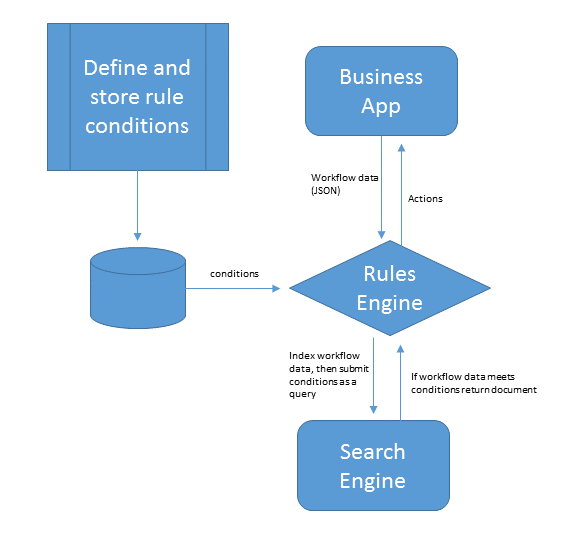
Rules engines are divided into two parts, conditions and actions. Business applications will define conditions and the corresponding actions the application should take given the conditions. The conditions in a rules engine consist of a set of evaluations of the state of an object at any given point of time. I propose that given the capabilities of a search engine it could be used as a rules engine. Conditions in a rules engine can be converted to a query against a particular document (JSON). The query could be stored and used by the rules engine to evaluate the state of a document and then take the associated actions if the document meets the conditions. Leveraging the richness of the query language would increase the capabilities of the rules engine to define very complex rules and possibly make rule processing faster. So what would the required features of a search product be in order for it to function as a rules engine?

Required Features of a Search Based Rules Engine

Index Any Type of Document

The first feature of a search product to function as a rules engine would be the ability to index any type of document. In this case a document would be any valid JSON document. In addition, since application data can be very dynamic a search product with the ability to query any value of that data without the overhead of having to define the schema of the document would be even better.

A Rich Query Domain Specific Language

Application rules can be very complicated and if you are going to use search as a rules engine then the product must have a strong query DSL (Domain Specific Language). The DSL should support the grouping or chaining of queries together to form a true or false condition. The query DSL should also support the turning off of word breaking of string values. Rules typically require exact matches and some search engines word break by default. Finally the query DSL should have the ability to be easily stored and retrieved. This ability is essential since you will want to capture business rules and translate them to query DSL storing them for later execution.

Near Real-Time Indexing

How fast a document is available to be searched after indexing is the most important feature for a search rules engine. Some applications will have data that is changed and must be evaluated immediately. In this case the search product must support real-time indexing where the document is available within one second. In other cases where the data is relatively stagnant it is possible to have higher index latency.

SharePoint Search , Azure Search and Elasticsearch How Do They Stack Up?

SharePoint Search

Unfortunately, SharePoint Search fails on all three features. SharePoint does not have real-time indexing. There is no ability to programmatically  index a document. Secondly it cannot index any type of document. It is limited to whatever IFilters that have been enabled. Finally the query DSL (KQL) is limited. There has been innovation with Delve and the Graph query DSL, however, it is still limited to social and collaboration scenarios.

Azure Search

Azure Search is built on top of Elasticsearch and is strong in all the features except the query DSL. The query DSL remains simple and is geared more towards less robust mobile apps. You can index any type of document however you must define your schema before it can be searched on anything other than it’s ID. You can search on your document within one second of indexing. A great benefit is that all fields are filterable by default, which means they support exact value matching only.

Elasticsearch

ElasticSearch meets all the above feature requirements to be a search rules engine. You can index any document and search on it within one second and not have to define a schema. The ElasticSearch query DSL has an incredible amount of features to support a search rules engine. It has the ability to combine multiple queries into a complex Boolean expression. However, fields are not by default set up to be searched with exact matching. This will require extra index mapping configuration especially if you are wanting to query arrays of child objects.  Finally the query DSL is defined in JSON making it easy to construct, store, and retrieve.

What about NoSQL products like DocumentDB?

NoSQL databases are also an ideal technology for implementing a rules engine. These types of databases can handle large complex documents, however the query DSL for these types of databases can vary and you must trade off between read and write optimizations. With Some NoSQL databases you must do some upfront indexing in order for the data to be immediately available for evaluation.

The Future is JSON Documents

It is becoming much easier to ramp up solutions using JSON documents. The richness and flexibility the format offers makes it easy to integrate multiple data flows into your enterprise solutions. This flexibility along with new search technologies can be combined to implement a fairly robust rules engine to drive some of your workflow applications. Search can play significant role in your applications. Search is not just for finding relevant documents but can be used to supplement or even drive application logic.