Thursday, May 28, 2015

Get a Handle on Your SharePoint Site Closure and Deletion Policies with JavaScript

Technorati Tags: ,,,,

What is great about SharePoint hosted Add-ins (Apps) is that you can come up with some very interesting ideas on how to make people’s life so much more productive. SharePoint has the ability to define s site policy for closing and deleting sites over a period of time. This is great when you are trying to manage many sites and sub sites that tend to proliferate over time. There has been a lot written about how this works and the benefits Overview of Site Policies. In this post I am going to give you some ideas on how you could create a SharePoint hosted Add-in that could help make it easier to view how your policies have been applied. I will also give you an overview on what is available for site policy management with JavaScript.

Site Policy and JavaScript

There is some documentation on the .Net managed remote API for managing site policies but of course there is none for JavaScript. You can use the Microsoft.Office.RecordsManagement.InformationPolicy.ProjectPolicy namespace for the .Net managed remote API but you must load the SP.Policy.js file and use the SP.InformationPolicy.ProjectPolicy namespace in JavaScript. Apparently, applying site policies to a web is considered a project. All methods except SavePolicy are static methods. Also, every methods except SavePolicy takes a target SP.Web and the current context as arguments. Unfortunately, none of the methods are callable via the REST interface because the SP.Web is not included in the entity model. Still waiting on this. The following methods are available for managing site policies:

ApplyProjectPolicy: Apply a policy to a target web. This will replace the existing one.

CloseProject: This will close a site. When a site is closed, it is trimmed from places that aggregate open sites to site members such as Outlook, OWA, and Project Server. Members can still access and modify site content until it is automatically or manually deleted.

DoesProjectHavePolicy: This will return true if the target web argument has a policy applied to it.

GetCurrentlyAppliedProjectPolicyOnWeb: Returns the policy currently applied to the target web argument.

GetProjectCloseDate: Returns the date when the target web was closed or will be closed. Returns (System.DateTime.MinValue) if null.

GetProjectExpirationDate: Returns the date when the target web was deleted or will be deleted. Returns (System.DateTime.MinValue) if null.

GetProjectPolicies: Returns the available policies that you can apply to a target web.

IsProjectClosed: Returns true if the target web argument is closed.

OpenProject; Basically the opposite of the CloseProject method.

PostPoneProject: Postpones the closing of the target web if it is not all ready closed.

SavePolicy: Saves the current policy.

When working with policies you have the Name, Description, EmailBody, EmailBodyWithTeamMailBox, and EmailSubject. You can only edit EmailBody, EmailBodyWithTeamMailBox and EmailSubject, and then call SavePolicy. There are no remote methods to create a new ProjectPolicy.

Applying a Site Policy with JavaScript Example

Below is an example of using the JavaScript Object Model to apply a site policy to a SP.Web. The code example is run from a SharePoint hosted Add-in and applies an available site policy to the host web. Of course your Add-in will need full control on the current site collection to do this.

function applyProjectPolicy() {
    appweburl = decodeURIComponent(getQueryStringParameter('SPAppWebUrl'));
    hostweburl = decodeURIComponent(getQueryStringParameter('SPHostUrl'));
    context = SP.ClientContext.get_current();
    appContextSite = new SP.AppContextSite(context, hostweburl);
    targetWeb = appContextSite.get_web();

    policies = SP.InformationPolicy.ProjectPolicy.getProjectPolicies(context, targetWeb);

    context.load(policies);
    context.executeQueryAsync(function () {
        policyEnumerator = policies.getEnumerator();
        while (policyEnumerator.moveNext()) {
            p = policyEnumerator.get_current();
            if (p.get_name() == "test my policy") {
                SP.InformationPolicy.ProjectPolicy.applyProjectPolicy(context, targetWeb, p);
                context.executeQueryAsync(function () {
                    alert('applied');
                }, function (sender,args) {
                    alert(args.get_message() + '\n' + args.get_stackTrace());
                });
            }
        }
    }, function (sender, args) {
        alert(args.get_message() + '\n' + args.get_stackTrace());
    });

}

Getting a Better View of Your Policies

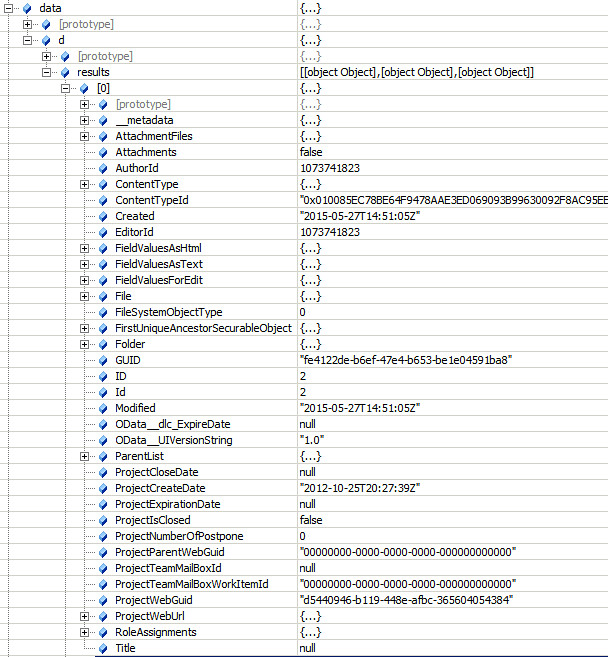
When applying a site policy to a target SP.Web all the information is stored in a hidden site collection list with the title of “Project Policy Items List”. Typically you would have to go to each site and click on “Site Settings” and click on “Site Closure and Deletion” to see what policy is applied. This informational page will show you when the site is due to close and/or be deleted. You can also immediately close it or postpone the deletion from this page. Instead of navigating to all these sites to view this information you could navigate the “Project Policy Items List” directly using he URL http://rootsite/ProjectPolicyItemList/AllItems.aspx. The AllItems view can be modified to display all the sites that have policies applied along with the expiration dates and even the number of times the deletion has been postponed.

Of course you probably don’t want to expose this list anywhere in the site collection navigation. You also want to be careful not to modify any of this information since it is used to control the workflows that close and delete sites. Your best bet here is to write a SharePoint Add-in to surface this data where it cannot be inadvertently modified. You can make a rest call to get these items and then load the data into the grid of your choice.

function getProjectPolicyItems() {
    appweburl = decodeURIComponent(getQueryStringParameter('SPAppWebUrl'));
    hostweburl = decodeURIComponent(getQueryStringParameter('SPHostUrl'));
    sourceUrl = appweburl + "/_api/SP.AppContextSite(@target)/web/lists/getbytitle('Project Policy Item List')/items?@target='" + hostweburl + "'";

    $.ajax({
        'url': sourceUrl,
        'method': 'GET',
        'headers': {
            'accept': 'application/json;odata=verbose'
        },
        success: function (data) {
            d = data;
        },
        error: function (err) {
            alert(JSON.stringify(err));
        }
    });

}
Creating Value with JavaScript

It is easy to create a SharePoint Add-in to put this data into a custom grid and then have actions to call the SharePoint JSOM to change policies on sites, re-open closed sites, postpone deletion or change the email that is sent out. You could select multiple sites and apply the action once. There are many possibilities to increase productivity. The one thing that is missing from the SharePoint Remote API is having the ability to view site policies settings. These settings are important when you want information about a policy that is applied to the site. You may want to know what type of site policy it is, for example, is it a close and delete policy or just a close policy? Can users postpone the deletion? Is email notification enabled and how often will it be sent? This would be information an administrator would want to quickly view from a SharePoint Add-in. Unfortunately, this information is stored in a property of the ContentType called XmlDocuments which is not available in the SharePoint Remote API. Every time you create a new site policy it creates a new ContentType in the root web of the site collection. All the site policy settings are stored as an xml document in the XmlDocuments property. It would be nice to have this information and especially if could be returned as JSON.

The JSOM and REST SharePoint Remote API still has many sections that are not documented. This is a shame because more and more developers are turning to creating client side Add-ins for their simplicity in deployment and configuration. I hope this post helped you understand what is available in the client side SharePoint Remote API for site policy management. Many times just because it is not listed in MSDN does not mean it is not available. Keep digging!

Monday, April 27, 2015

SharePoint Search, Azure Search and ElasticSearch

Technorati Tags: ,,,,

In the past six months I have been developing solutions using SharePoint, Azure and ElasticSearch. I wanted to write a post doing a brief comparison between the three search technologies. I also want to voice my concerns and hopes regarding the direction of SharePoint search. Microsoft has created Azure Search which is an abstraction running on top of ElasticSearch. Azure Search is still only in preview however it seems to be Microsoft’s focus for searching in the Cloud. The question is why was the focus not to use SharePoint search? In this post I will try to give you some reasons and why I think SharePoint search needs to incorporate some of the great features you see in ElasticSearch.

What is Unstructured Data?

Application data is seldom just a simple list of keys and values. Typically it is a complex data structure that may contain dates, geo locations, other objects, or arrays of values.

One of these days your going to want to store this data in SharePoint, can you say InfoPath? Trying to do this with SharePoint is the equivalent of trying to squeeze your rich, expressive objects into a very big spreadsheet: you have to flatten the object to fit the document library schema—usually one field per column—basically you lose all the expressive and relational data that your business needs.

Application data can be stored as JavaScript Object Notation, or JSON, as the serialization format for documents. JSON serialization is supported by most programming languages, and has become the standard format used by the NoSQL movement. It is simple, concise, and easy to read.

Consider this JSON document, which represents an invoice:

{
                  "vendorname": "Metal Container",
                  "items": [
                     {
                        "productdesc": "50 gal cannister",
                        "productid": 1256,
                        "productuom": "ea",
                        "quantity": 12,
                        "price": 25
                     },
                     {
                        "productdesc": "25 gal drum",
                        "productid": 1257,
                        "productuom": "ea",
                        "quantity": 12,
                        "price": 10
                     }
                  ],
                  "discountamt": 5,
                  "discountdate": "2014-02-28T00:00:00",
                  "vendor": 1600,
                  "duedate": "2014-03-31T00:00:00",
                  "invoicetotal": 420,
                  "invoicenumber": 2569
  }

This invoice object is complex, however the structure and meaning of the object has been retained in the JSON. Azure Search and ElasticSearch are document oriented, meaning that they store entire objects or documents. They also index the contents of each document in order to make them searchable. Document oriented searching  indexes, searches, sorts, and filters documents on the whole object not just on key value pairs. This is a fundamentally different way of thinking about data and is one of the reasons document oriented search can perform complex searches.

A Comparison of Searches


Above is a table listing a few features to compare the search technologies. Granted these are just a few and there are many other factors to compare. All of the features except for “Index Unstructured Data” are features focused on by search consumers.


SharePoint Search


SharePoint has a limit of 100 million indexed items per search service application. However, SharePoint’s strength is in crawling and indexing binary data. The other two do not come close to matching SharePoint’s capabilities. SharePoint has an extendable infrastructure which allows you to add your own custom content filtering and enrichment. SharePoint search out of the box can crawl many different types of file stores making it easy to get up an running. SharePoint’s query language (KQL) is rich enough to allow more knowledgeable developers to create some informative search experiences for users. SharePoint search has a huge advantage over Azure and ElasticSearch when it comes to security trimming search results. SharePoint can trim results to the item level using access control lists associated with the document. SharePoint even has the ability to customize security trimming with a post security interface you can implement.


Keyword Query Language (KQL) syntax reference


Azure Search


According to preliminary documentation one single Azure dedicated search service is limited to indexing 180 million items. This is based on 15 million items per partition with a maximum of 12 partitions per service. As with SharePoint you could increase the number of total items if you created more search services. Azure search does not support crawling and indexing binary data. It is up to you to push or pull the document data into the index. You can push data into the index with with the Azure Search easy to use API in either REST or .NET. Azure Search also supports pulling the data through it’s built in Indexers that support Azure DocumentDB , Azure SQL or Azure hosted SQL. An Azure indexer can be scheduled to periodically run and sync changes with the index. This is very similar to a SharePoint crawl except Azure indexers do not index binary data such as images. Full-Text searching of document object fields is supported. Azure search supports authentication except not on a user level but through an api-key passed through an HTTP header. Theoretically you can control user access through the OData $filter command in the API. Azure has its own query language which uses the basic operators such as ge, ne, gt, lt. It does have some geospatial functions for distance searching.


Azure OData Expression Syntax for Azure Search


Just remember that Azure Search is an abstraction layer that runs on top of ElasticSearch.


ElasticSearch


ElasticSearch is an open source java based free search product that runs on top of Lucene. Lucene search has been around for a while but it is very complex. ElasticSearch is a product that mixes analytics with search and can create some very powerful insights into your index. It can index an unlimited number of items just as long as you have the servers to support it. Horizontally scaling your search could not be easier. This is why it was chosen by Microsoft to be used in Azure. It does not support crawling. It supports pushing data into the index via an easy to use REST API. It also supports pulling data using a pluggable “river” API.  Rivers can be plugged in for popular NoSQL databases such as CouchDB and MongoDB. Unfortunately, rivers are now deprecated in version 1.5. However, you should be able to obtain comparable “LogStash” services which will push the data changes into the index. Azure Search more than likely is using LogStash to push data into their own instances of ElasticSearch. Security trimming is limited in ElasticSearch. It supports roles that can be synced with LDAP or AD via the “Shield” product. However, these roles do not offer item level security trimming like SharePoint does. The roles are typically used to limit access to certain indexes. ElasticSearch does support full-text searching of binary data such as images. I successfully achieved this MongoDB and GridFS. However, as with SharePoint storing indexing binary data takes up a lot of storage. ElasticSearch has a full fledged sophisticated query language allowing you to search and compare nested objects within documents all executed through a REST API.


ElasticSearch Query DSL


So What is the Big Deal about Unstructured Data?


Many businesses use SharePoint to store transactional content like forms and images. Through forms processing, complex data can be captured that contains parent and child sectional data. Businesses operate on many types of forms with data being organized on the form for a purpose. For example with an invoice it has child line item details that is important data to a business. If the forms processor can create a JSON object capturing the invoice as an entity, then with a NoSQL repository it can be stored intact. SharePoint on the other hand would force you to store the invoice within two lists, one for the invoice and the other for the line items. From a search perspective you would lose the relationship between the invoice and the invoice’s line items.


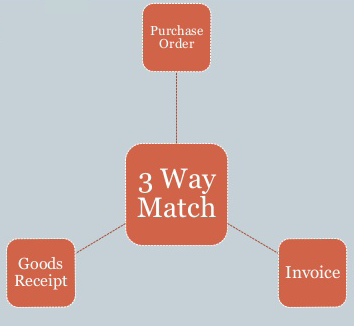
Relationships matter when it comes to search. For example account payable departments may use a “three-way matching” payment verification technique to ensure that only authorized purchases are reimbursed, thereby preventing losses due to fraud and carelessness. This technique matches the supplier invoice to the related purchase order by checking what was ordered versus what was billed. This of course would require checking line item detail. Finally, the technique then matches the invoice to a a receiving document ensuring that the quantity received is what was billed.


Having the ability to store the document data as JSON enables business to automate this process using search technologies that index this type of data. SharePoint does not have this ability, Azure Search’s query language currently is not sophisticated enough to do this. However, ElasticSearch’s query language is capable of matching on nested objects in these types of scenarios. Being able to leverage your search to automate a normally labor intensive process can save a business a lot of money.


Search Makes a Difference


Microsoft is moving in the right direction with search. In Azure Microsoft is building services around NoSQL and NoSQL searching. However, the focus is still more about mobility, social and collaboration. These are important, but many businesses run on transactional data such as forms and images. I would like to see SharePoint have the ability to integrate better with Azure DocumentDB and Search, opening up the query language more to enable the rich query features of ElasticSearch. In addition, it is imperative that Microsoft come up with a better forms architecture enabling the use of JSON rather than XML for storage. This would open many opportunities to leverage search such as automating some transactional content management workflows step, building more sophisticated e-discovery cases and intelligent retention policies.